04 — A second resource type: DynamoDB table
Point of this exercise: make sure the building blocks from exercises 01–03 aren't S3-specific knowledge — apply the exact same resource pattern to a completely different AWS service. Reused the full bucket + IAM user/policy/attachment setup from exercise 03 and added one new resource type. Code in 04-dynamodb-table/.
The new resource
resource "aws_dynamodb_table" "practice_table" {
  name         = "practice-items"
  billing_mode = "PAY_PER_REQUEST"
  hash_key     = "id"

  attribute {
    name = "id"
    type = "S"
  }
}
billing_mode = "PAY_PER_REQUEST"— pay only for the requests actually made, no capacity to provision or guess ahead of time. The right default for a practice table or small project;PROVISIONEDmode needs an explicit read/write capacity guess, which either throttles (too low) or wastes money (too high).hash_key = "id"— the partition key. Every item in the table needs a unique value for this column.attribute { name = "id", type = "S" }— a real DynamoDB-specific thing, different from a SQL table: only the attributes used as keys need to be declared up front. DynamoDB is schema-less beyond its keys — any item can carry whatever other fields it wants, undeclared.type = "S"is string;"N"is number,"B"is binary.
A permissions wall, again — this time a naming one, not an access one
First apply partially failed, but differently from exercise 03's AccessDenied:
EntityAlreadyExists: User with name practice-bucket-user already exists.
EntityAlreadyExists: A policy called practice-bucket-access already exists.
The bucket and the DynamoDB table were created fine. The IAM user and policy failed — not from missing permissions this time, but because I'd copied exercise 03's main.tf as a starting point and left the IAM user/policy names (practice-bucket-user, practice-bucket-access) exactly as they were. IAM names are unique per AWS account, not per Terraform project. Exercise 03 and exercise 04 are two completely separate Terraform projects with their own state files, but they both point at the same real AWS account — so from AWS's point of view, two unrelated projects tried to create a resource with an identical name, which it refuses regardless of which .tf file asked for it.
This is the IAM version of the same constraint S3 bucket names already taught in exercise 01 (global uniqueness) — just scoped to the account instead of to all of AWS.
Fixed by giving this exercise's IAM resources their own unique names:
resource "aws_iam_user" "app_user" {
  name = "practice-bucket-user-04"
}

resource "aws_iam_policy" "s3_access" {
  name = "practice-bucket-access-04"
  ...
No change needed to the terraform-practice-iam permissions policy itself — it was already scoped to the practice-bucket-* wildcard pattern, which covers the -04 suffix automatically.
Re-running apply
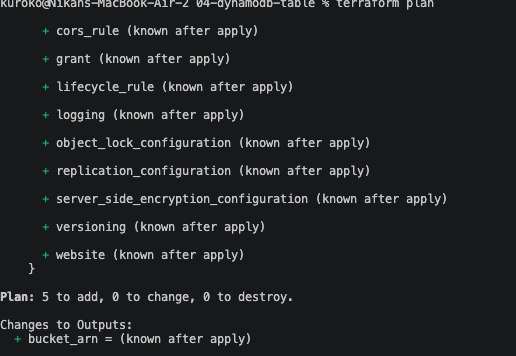
Re-ran plan — 5 to add the first time (bucket, user, policy, table, attachment):
After the name fix, re-ran apply — this time 3 to add, not 5, since Terraform's state already had the bucket and the DynamoDB table recorded as created from the earlier partial run:
aws_iam_user.app_user: Creation complete [id=practice-bucket-user-04]
aws_iam_policy.s3_access: Creation complete [id=arn:aws:iam::654654323932:policy/practice-bucket-access-04]
aws_iam_user_policy_attachment.attach: Creation complete

Apply complete! Resources: 3 added, 0 changed, 0 destroyed.
bucket_arn = "arn:aws:s3:::nikan-terraform-practice-04"
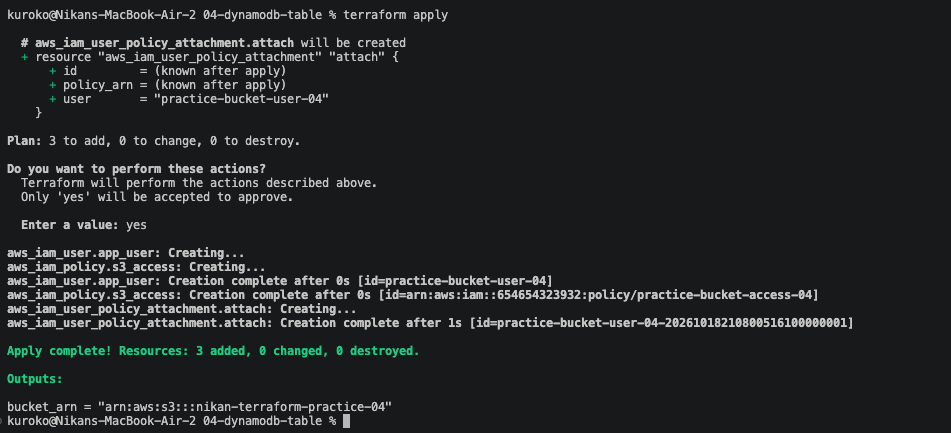
Same lesson as exercise 03's partial failure, from a different cause this time: Terraform tracks exactly what succeeded and what didn't, and a re-run only touches what's actually still missing.